Stack the States® 2
Dan Russell-PinsonEducational
4.6167.00 Reviews
- Version
- 2.3
- Installs
- 10.00K
- Age Rating
- Everyone
Screenshots
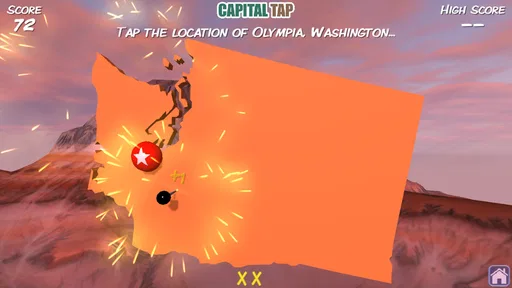
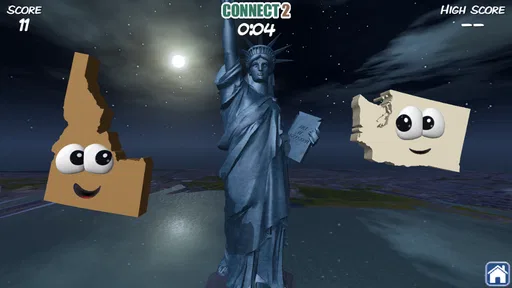
Our Review of Stack the States® 2
 Analysis by Appyee
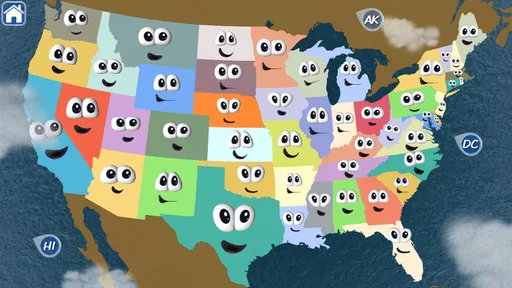
I found Stack the States® 2 most interesting when I stopped treating it like a simple geography quiz and started using it as a short, repeatable learning game. Its basic idea is easy to understand: identify US states, learn where they belong, and keep improving through play. That makes it approachable for children, families, and adults who want a more active way to review geography than reading a map.
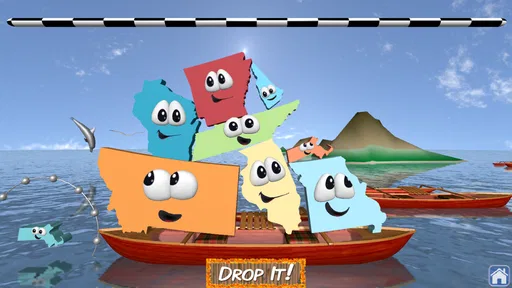
What makes it worth considering is the combination of recognition and action. You are not only trying to remember a state’s name; you are also working toward a visible result on the screen. That small physical sense of building progress gives each correct answer more weight than a standard flashcard. I found myself paying closer attention to borders and locations because the game turns those details into something I had to use, not merely look at.
Developed by Dan Russell-Pinson, this educational game has a 4.6 average from around 468 ratings and more than 10K installs. It is aimed at Everyone, costs $2.99, and requires Android 5.1 or later. The current version is 2.3, and the game was released on August 8, 2016. Those details place it firmly in the paid, focused-learning category rather than the constantly changing world of large free-to-play games.
Small goals make the first sessions easy to start
The early appeal comes from having a clear goal almost immediately. I do not need to study a long explanation before beginning, and I do not have to understand a complicated menu structure. The game presents geography as a sequence of manageable decisions, which is useful when a child is playing independently or when an adult wants a quick review during a spare moment.
That simplicity is also helpful for parents and teachers. A learner can begin with a basic familiarity with the United States and gradually discover which areas are easy to recognize and which ones keep causing mistakes. Instead of turning the first session into a lesson about every state at once, the game encourages learning through repeated contact.
I would use it with a child who has recently started learning US geography, but I would not expect it to replace a proper map lesson. The game is best at reinforcement. It can make names and shapes more familiar, yet a learner still benefits from seeing a labeled map, discussing regions, and connecting locations with real places. In my experience, the strongest routine is to play first, then look at a map afterward and investigate the states that caused trouble.
The stacking idea gives the opening moments a useful sense of purpose. A correct response does not feel like an isolated mark on a worksheet. It contributes to a growing structure, so the learner receives immediate visual feedback. This is a small design choice, but it helps younger players understand why another round is worth attempting.
How I would use it in an ordinary week
A realistic everyday scenario would be a ten-minute session after school. A child could play a few rounds, notice that several neighboring states are being confused, and then pause rather than continuing until attention disappears. Later that evening, a parent could open a paper or digital map and ask the child to find those states. The game supplies the prompt; the follow-up conversation supplies context.
For an adult, the same routine works before a road trip or while brushing up for a classroom activity. I would not use it as a serious reference tool, but I would use it to expose weak spots quickly. If I repeatedly hesitate over a group of states, that tells me where to focus instead of wasting time reviewing everything equally.
One useful habit is to separate speed from accuracy. On the first attempt, I would concentrate on identifying the correct state and understanding its position. On later attempts, I would try to respond more quickly. This prevents the pressure of fast play from hiding the actual learning problem. A player who guesses rapidly without remembering the location may appear successful while retaining very little.
Progress feels visible without becoming complicated
The game’s progress signals are easy to read because they are tied to what I am doing on screen. Building and completing goals provides a more satisfying response than simply moving from one question to the next. I can tell when a session is going well, and mistakes are noticeable without requiring a separate score explanation.
That visibility matters for younger players. A child may not care about memorizing a list of state names, but may care about completing a structure or improving a result. The educational benefit arrives through that motivation. I also appreciate that the game does not need to pretend to be a full adventure to make progress meaningful; its limited subject gives the feedback a clear purpose.
At the same time, players should understand what kind of progress this represents. It is progress within a compact geography game, not a complete course in US history, regional culture, capitals, or civic knowledge. Someone looking for broad educational coverage may find the scope narrow. That is not a flaw in a focused title, but it does affect whether the $2.99 purchase feels worthwhile for a particular household.
The strongest signal for me is not simply reaching a better result. It is noticing that recognition becomes more automatic. At first, I may need to think about a state’s outline or location. After repeated sessions, the answer can become quicker because the visual memory has been reinforced. That is the kind of improvement the game can support, provided I return to the material instead of playing only once.
I also recommend treating mistakes as study notes. When I miss a state, I would avoid immediately tapping through another round without reflection. I would say the name aloud, locate it on a map, and compare it with the state I selected by mistake. This turns an incorrect response into a specific correction. It is a more effective workflow than relying on repetition alone.
The difficulty works best when the player accepts a gradual pace
The difficulty curve is not about dramatic surprises; it comes from the difference between recognizing familiar states and handling less memorable ones. Early success can feel comfortable, especially for someone who has seen a US map before. The challenge becomes more meaningful when similar shapes, neighboring locations, or less familiar names begin to expose gaps in memory.
I like that this creates a natural reason to replay. A learner can finish a session feeling capable while still having a few clear weaknesses to address. The game does not need to make every round punishing. For educational software, a steady mixture of confidence and correction is usually more useful than constant failure.
Still, the pace may not satisfy players who want a complex strategy game. The stacking theme adds physical involvement, but the main intellectual task remains geography recognition. If you are expecting deep puzzles, a long narrative, or a broad collection of unrelated challenges, this will feel too focused. I would choose it for practice, not for elaborate game-world exploration.
Another trade-off is that prior knowledge changes the experience considerably. A child beginning from scratch may need patient guidance and repeated sessions. An adult who already knows most state locations may move through the early material quickly and look for a stronger challenge. In that situation, the value comes from accuracy practice and filling small gaps rather than discovering an entirely new subject.
My advice is to keep sessions short enough that attention remains active. Once a player begins tapping from habit, the educational benefit drops. A few deliberate rounds followed by a break are better than a long stretch in which the learner remembers only the frustration of repeated errors. This is especially important when using the game with younger children.
What keeps the game in rotation, and where that pressure ends
The retention appeal comes from the desire to improve a visible result and close knowledge gaps. I can return because I remember making a particular mistake, because I want a cleaner run, or because I want to see whether a previously difficult state now feels obvious. Those are healthy reasons to replay: they are connected to learning rather than to an endless stream of unrelated rewards.
That said, the game’s subject naturally limits long-term variety. Once I know the states well, the surprise decreases. The lasting value then depends on whether I enjoy refining speed and accuracy or whether I need a broader set of topics. This is why I would recommend it more strongly as a family learning tool or study companion than as someone’s only mobile game.
The paid price changes the way I judge that retention. At $2.99, I do not expect a huge content ecosystem or constant updates. I expect a focused experience that I can revisit when geography practice is useful. For a parent who wants a child-friendly educational purchase without building a larger subscription commitment, that can be a sensible trade-off. For a player who wants unlimited novelty, it may feel limited sooner.
There is also a difference between replay value and educational repetition. Replaying the same type of task can strengthen memory, but it can also become mechanical. To avoid that, I would alternate game sessions with real-world applications: tracing a route across a map, identifying states seen in the news, or checking locations before a trip. The game is more effective when it is part of a wider learning habit.
Teachers could use it as a warm-up rather than a complete classroom activity. A short round might reveal which names students recognize, followed by group work with a wall map. I would not make the game the sole measure of understanding because fast recognition on a screen does not always mean a student can explain regional relationships or locate a state without prompts.
Who should choose it, and who should look elsewhere?
I think it is a good fit for children who respond to visual goals, families looking for a shared learning activity, and adults who want a compact way to refresh US geography. Its Everyone content rating makes it suitable for a broad audience, while the straightforward premise reduces the amount of supervision needed after the first explanation.
I would be more cautious about recommending it to someone seeking a free download, a broad world-geography course, or a detailed reference resource. The purchase is modest, but it is still a purchase, and the focus is specifically US states. If your main goal is capitals, flags, world regions, or historical context, another educational app will probably serve you better.
I would also skip it for a child who becomes discouraged by repeated recognition errors unless an adult is ready to turn mistakes into a calm learning exercise. The game can make practice more inviting, but it cannot remove the need for patience. A child who needs a highly adaptive lesson plan may benefit more from a structured educational platform that adjusts instruction in greater depth.
Compared with paper flashcards, this game is more engaging and gives immediate visual feedback, but cards are easier to customize and discuss. Compared with a labeled map, it is more interactive but less useful for open-ended exploration. Compared with a general quiz app, it offers a clearer connection between answers and locations. I would choose it when motivation and repetition are the main problems, not when comprehensive teaching is the priority.
My verdict on the progression and pacing
After spending time with it, I see the progression as deliberately compact. Early goals are understandable, progress is visible, and the difficulty grows mainly by exposing the difference between familiar recognition and genuine recall. The pacing works when I approach the game as a series of short practice sessions rather than expecting a large campaign.
The most valuable technique is to use each mistake as a starting point for a second activity. Say the state name, find it on a map, compare it with the mistaken choice, and return later for another attempt. That workflow turns the game from a quick distraction into a practical study aid. It is also the clearest way to get more value from a focused title whose content is intentionally narrow.
My main reservation is longevity for advanced players. Once the geography becomes comfortable, the motivation to continue may depend heavily on personal interest in improving performance. Players seeking constant unlocks, varied genres, or a large amount of new material should choose something else. The game’s strength is concentration, and concentration inevitably means less breadth.
For the right audience, however, that focus is exactly the point. Dan Russell-Pinson’s educational game makes state geography feel active without burying the lesson under unnecessary complexity. With a 4.6 average and over 10K installs, it has clearly found an audience, but I would still judge it by fit rather than popularity. If you want a friendly, focused way to practice US state recognition, this is a purchase I can recommend; if you need a complete geography curriculum, treat it as one useful piece rather than the whole solution.
Verdict
Strengths of Stack the States® 2
- Engaging state-themed gameplay makes geography practice feel like a casual game.
- Includes varied question types to reinforce facts beyond simple memorization.
- Bright visuals and animations keep younger players interested during practice.
- Can be useful for independent learning without requiring constant adult guidance.
- Progress-based challenges give learners a clear sense of improvement.
Limitations of Stack the States® 2
- Some content may feel too easy for older students or advanced geography learners.
- Repeated questions can reduce variety after extended play sessions.
- The educational focus may appeal less to children seeking a fast-paced game.
- Requires attention to detailed state facts that younger players may find difficult.
- The app may have limited value for users outside the United States.
Other Releases by Dan Russell-Pinson
View All
Stack the States®
Education4.7

Stack the Countries®
Education4.5
Similar Picks in This Category
View All
Little Panda Policeman
BabyBus4.0

Monster Trucks Game for Kids 2
Raz Games4.1

Little Panda's Chinese Recipes
BabyBus4.4

Little Panda's Restaurant
BabyBus4.4

Little Panda's Ice Cream Games
BabyBus4.3

Baby Panda Care
BabyBus3.8
Frequently Asked Questions
What is Stack the States® 2 and how is the game played?
Stack the States® 2 is an educational geography game focused on the United States. Players answer questions about states, capitals, landmarks, geography, and other related facts to earn states that can be stacked into a tower. The goal is to build a high, stable stack while learning through short quiz rounds and interactive challenges rather than simply reading static information.
Is Stack the States® 2 suitable for children and students?
The game is primarily designed for children and students who are learning about the United States, but it can also be enjoyable for adults who want a casual geography quiz. Its colorful presentation, simple controls, and game-based rewards make lessons feel less demanding. However, younger children may need help reading some questions, understanding unfamiliar terms, or navigating certain menus.
Does Stack the States® 2 work without an internet connection?
Many of the main quiz and stacking activities can generally be played offline after the application has been installed, which is useful for travel, classrooms, or situations without reliable mobile data. Some platform-dependent features, updates, advertisements, or download-related functions may still require an internet connection. It is best to open the game once online before relying on it offline.
What subjects and geography topics are covered in the game?
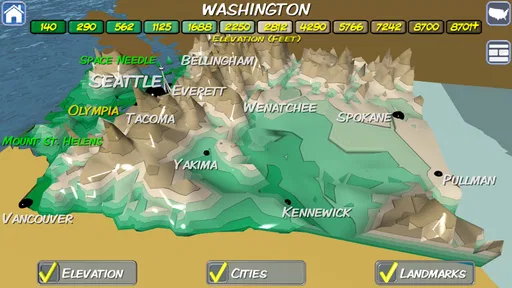
Stack the States® 2 covers a broad selection of United States geography and civics-related facts. Depending on the activity, questions may involve state locations, capitals, abbreviations, flags, landmarks, borders, symbols, and general state trivia. The exact question mix can vary, so players should expect both straightforward recall questions and items that test recognition or visual knowledge.
Is Stack the States® 2 free to download, and does it include in-app purchases?
The availability and pricing of Stack the States® 2 can differ between the Android and iOS stores, as well as by region and device. Before downloading, check the official store listing for the current price, supported devices, advertising information, and any in-app purchase details. Parents should also review purchase restrictions, since educational games may offer optional paid content or upgrades.
Play our best games!


